Developer Tools Guide
Inspect Element Tutorial Graphic Overview
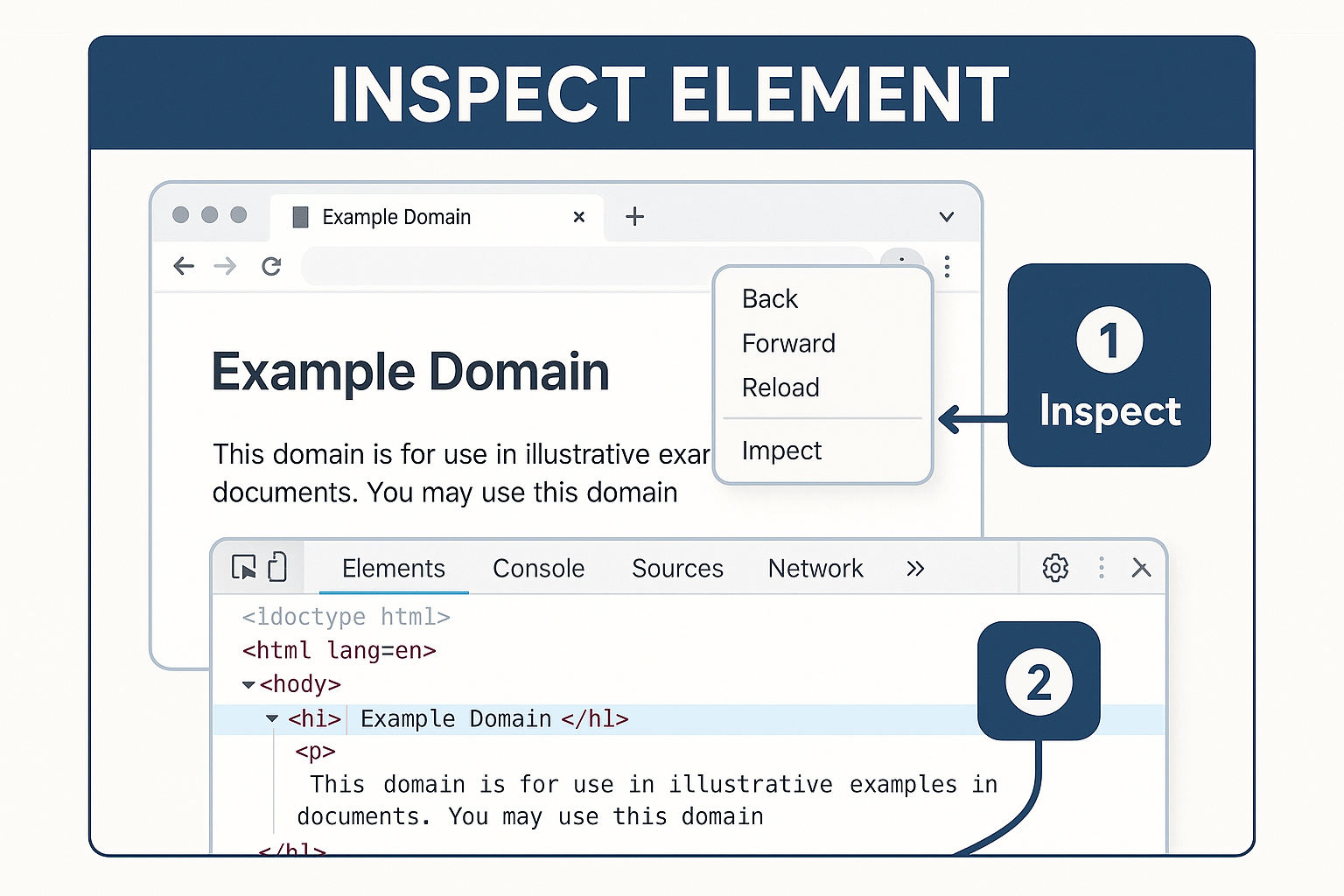
This inspect element tutorial graphic is a beginner-friendly visual guide showing how to access and use a browser’s developer tools. In the image, the user right-clicks the “Example Domain” page and selects “Inspect,” which opens the Chrome DevTools interface. Step 1 highlights the context menu used to initiate inspection. Step 2 zooms in on the HTML structure shown within the “Elements” tab. Moreover, inspecting elements is essential for front-end developers, QA testers, and designers who want to analyze or modify web content in real time. It allows users to explore underlying HTML, CSS, and JavaScript on any webpage. Furthermore, inspect element tools help with debugging layouts, editing live styles, and understanding DOM structure. In addition, it’s a core skill for learning web development and testing UI components. Therefore, this inspect element tutorial is perfect for classrooms, coding bootcamps, or technical documentation aimed at web learners or QA professionals.
Key Features of Inspect Element Tutorial Graphic
- Step-by-Step Visual: Demonstrates how to open Chrome DevTools using right-click context menu.
- HTML Element Highlight: Shows real-time access to webpage structure in the “Elements” tab.
- Browser-Based Learning: Reinforces how web content is structured and rendered on the front end.
What’s Included with Inspect Element Tutorial Graphic
- Screenshot of browser interface, context menu with “Inspect” option, and DevTools window showing the selected HTML element.
How to Use Inspect Element Tutorial Graphic
- Right-click on any webpage and select “Inspect” to open the Chrome developer tools panel.
- Navigate the Elements tab to view and interact with the HTML/CSS structure in real time.
Ideal Uses and Placement
- Use in web development tutorials, front-end testing guides, and browser automation training.
- Apply it in classroom slides, course materials, or onboarding docs for new developers and QA analysts.
Inspect Element Tutorial Graphic Specifications
- High-resolution visual with two-step callouts and annotated Chrome DevTools view featuring HTML inspection.
Inspect element tutorial showing browser right-click menu and Chrome DevTools with HTML view”
Explore More Resources
- Find similar products: Products Page
- Gain further insights: Our Blog
- Enhance your understanding: AI & QA Resources
- Learn from experts: Chrome DevTools Documentation
Why Choose Inspect Element Tutorial Graphic?
This tutorial simplifies a core web development skill with clear visuals and instructions. It accelerates learning for developers, testers, and digital designers. Moreover, it’s a must-have teaching tool in any front-end education setting.
Order Your Inspect Element Tutorial Graphic Today!
Teach and learn browser inspection with this easy-to-follow guide—perfect for web development students and QA teams!
$3.99
- ✅ Instant Download Available
- 🖼️ Ultra High-Resolution 4K PNG + JPG (4096×6144, 300 DPI)
- 🖨️ Prints Beautifully up to 13.6×20.5 inches
- ♾️ Unlimited Downloads
- 🔁 Commercial Use & Resale Allowed
- 💾 Digital Product – No Physical Item Shipped
- 📥 Instant Access via Download Link Post-Purchase
- 🛒 Want a Physical Print?
You can upload your downloaded artwork to services like Printful, Zazzle, or your local print shop to create stunning physical prints.
All 4K images include the label "4K" in their title.
If your selected image does not include "4K", please contact us for your complimentary upgrade.